


A WordPress Plugin for Comic Book Collectors, Conventionists, & Comic Shops That Use WooCommerce
Comic Collector turns your WordPress + WooCommerce site into a full-featured comic book storefront and collection manager. Import your existing collection, get real-time market pricing, accept offers from buyers, and list comics for sale with a single click. Whether you’ve got 50 books or 50,000, Comic Collector was built by a collector, for collectors.

Dashboard
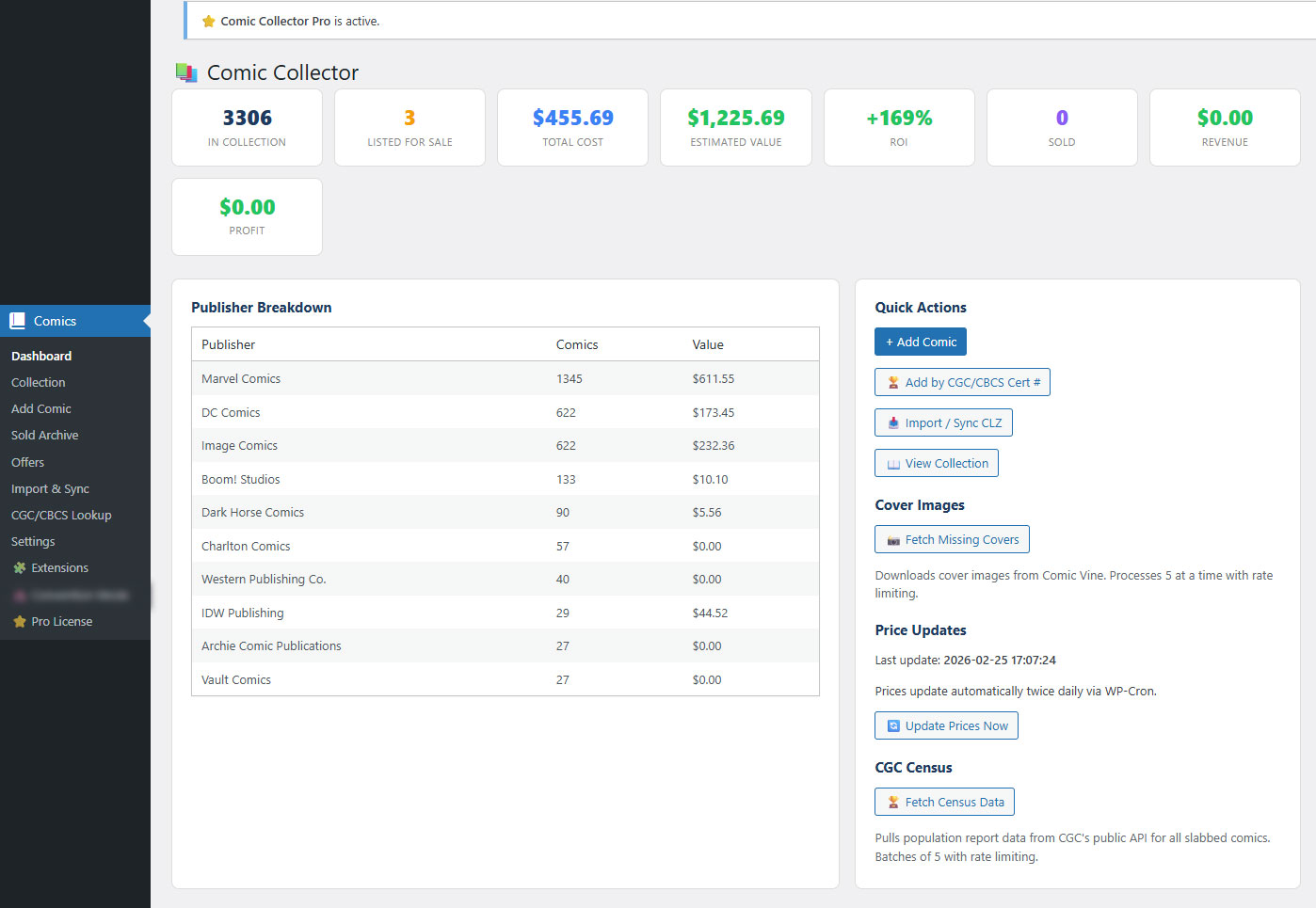
Collection Stats - total comics, total estimated value, average value per book, listed vs. unlisted counts.
Quick Actions - batch cover image fetch, batch CGC census pull, and test buttons for eBay and GoCollect API connectivity.
Settings Panel - configure eBay App ID, GoCollect API key, markup percentages, price floor, condition pricing, scraping toggle, public display options, and offer notification email.
Import / Sync
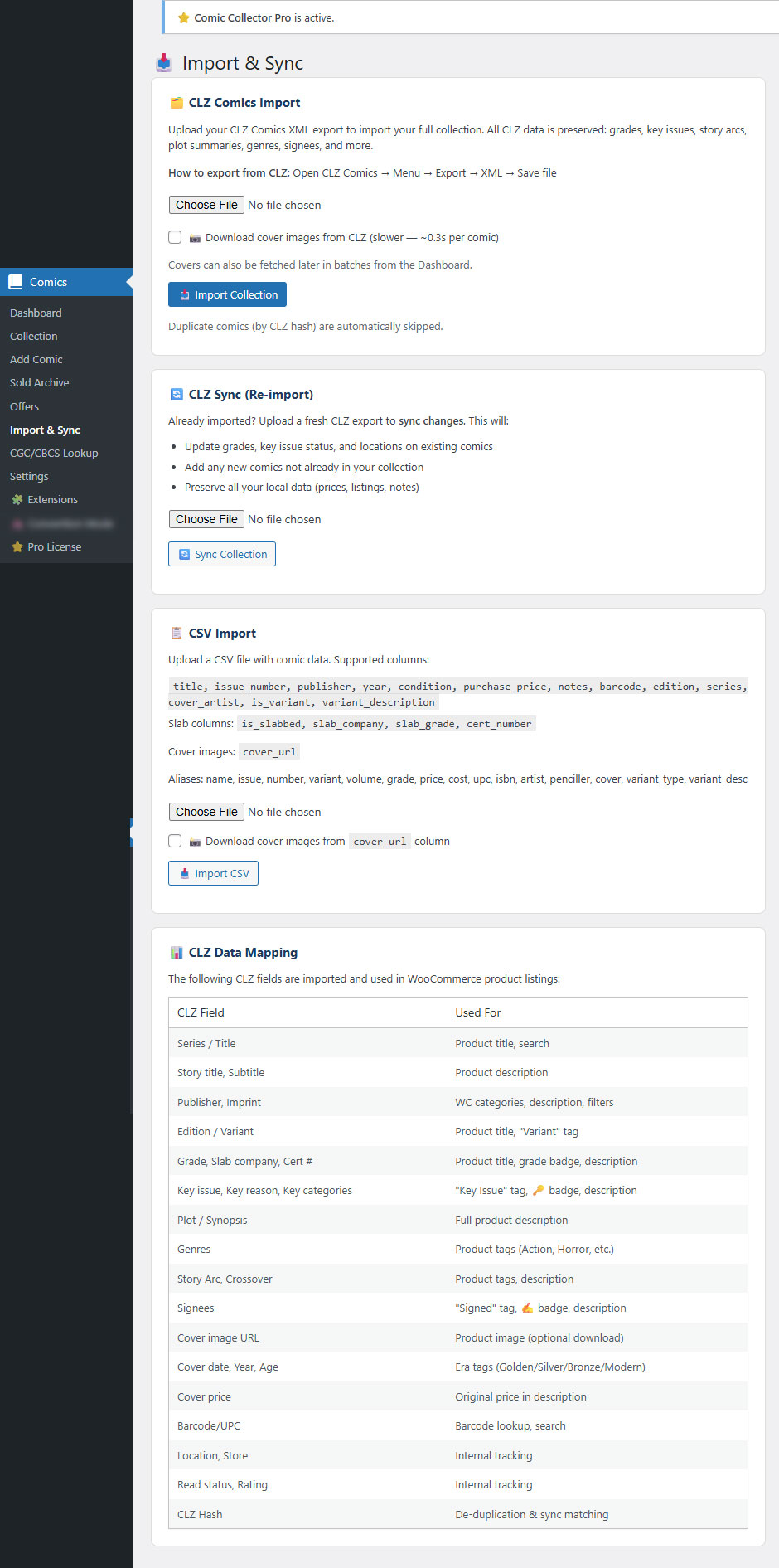
CLZ Comics XML Import - export from the CLZ Comics app and import directly. All CLZ data is preserved: grades, key issues, story arcs, plot summaries, genres, credit data, cover images, and more. The importer handles batches of any size.
CSV import - bring data from any source. Flexible column mapping with aliases (e.g., "artist" maps to cover_artist, "penciller" maps to cover_artist, "variant_type" maps to variant_description). Supports cover image URLs.
WooCommerce
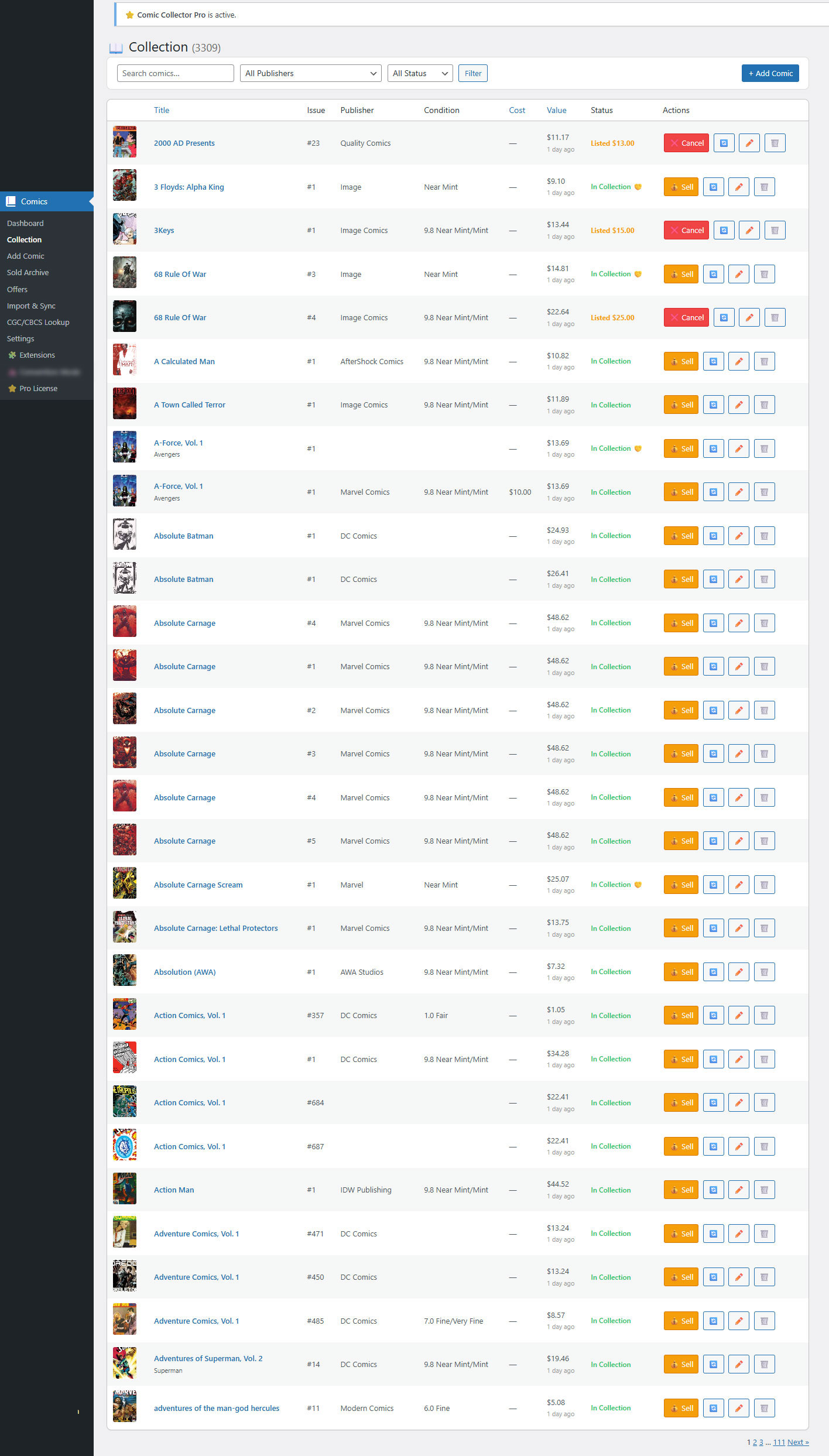
One-Click Listing - hit "Sell" on any comic and it creates a WooCommerce product automatically: title, description, price, cover image, SKU, and product category, all generated from your collection data.
Auto-Categorization - comics are organized into WooCommerce product categories by publisher (Marvel, DC, Image, etc.) under a parent "Comics" category.
Public Collection Display
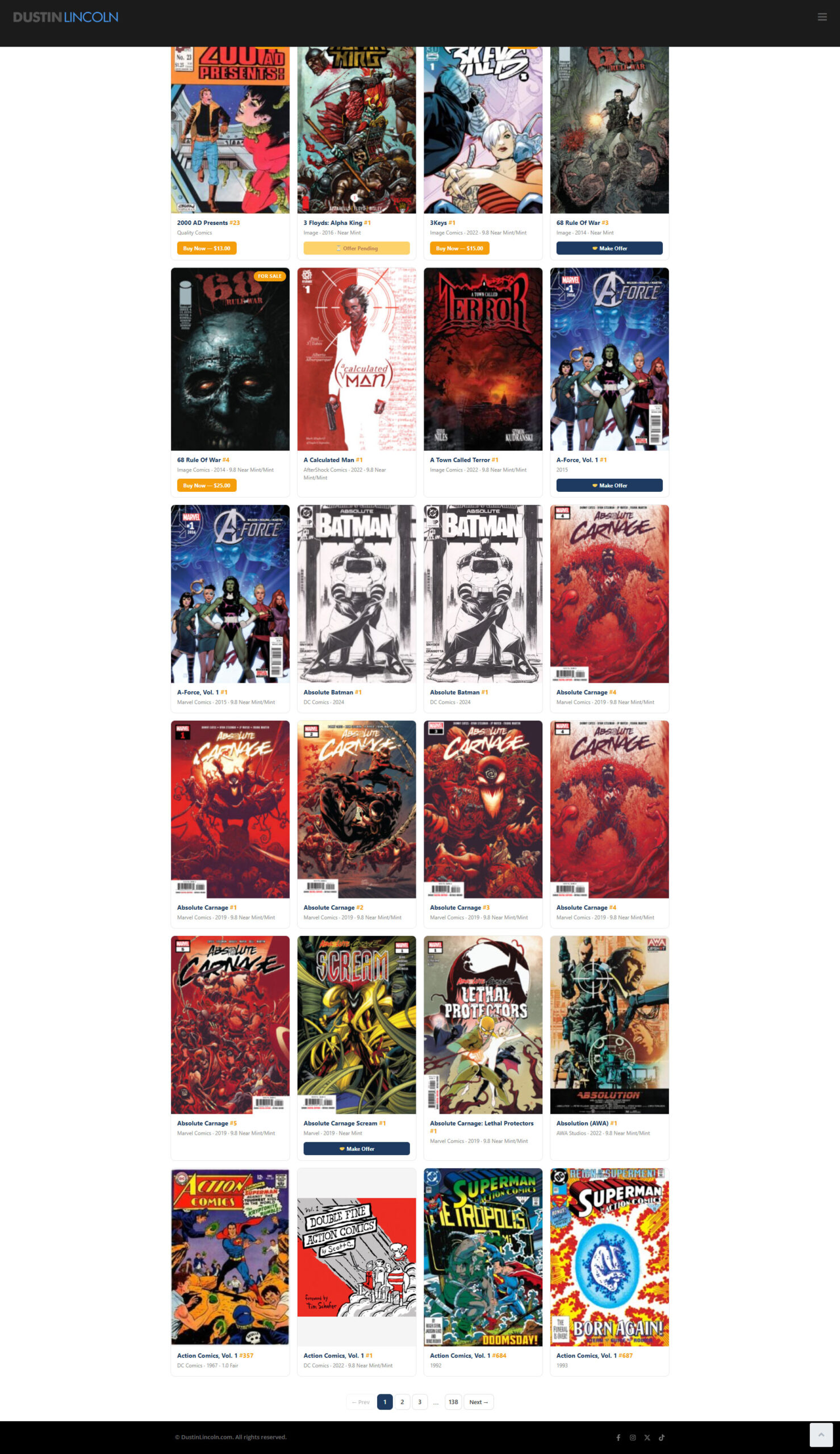
|comic_collection| Shortcode - embed your collection on any page. Visitors see a clean, mobile-friendly card grid with cover images, titles, grades, and values.
Configurable Value Display - show or hide estimated values globally from Settings, or per-shortcode with |comic_collection show_value="no"|. Useful when you're accepting offers and don't want to anchor buyers.
What You Get for Free
Collection Management
- Unlimited Comics - no caps, no per-book fees, no artificial limits.
- Detailed Data Fields for every book: title, series, issue number, edition, publisher, story title, subtitle, condition grade (1–10 scale), slab company and slab grade (CGC, CBCS, PGX), purchase price, cover price, barcode, certification number, variant cover designation, variant description, cover artist, key issue flag, notes, and more.
- Cover Images - upload your own photos or let the plugin fetch cover art automatically during import.
- Variant Cover Tracking - flag variant covers with descriptions so buyers know exactly what they're looking at.
- Cover Artist Field - auto-detected during CLZ imports from credit data (cover, cover artist, cover penciller, cover painter, etc.).
- Sold Archive - when a comic sells through WooCommerce, it moves automatically to your Sold Archive with full sale details (price, date, order number) so your active collection stays clean.
Import Your Existing Collection
- CLZ Comics XML Import - export from the CLZ Comics app and import directly. All CLZ data is preserved: grades, key issues, story arcs, plot summaries, genres, credit data, cover images, and more. The importer handles batches of any size.
- CLZ Re-Sync - upload a fresh CLZ export anytime to sync changes. New comics are added, existing records are updated, and nothing is duplicated.
- CSV Import - bring data from any source. Flexible column mapping with aliases (e.g., "artist" maps to cover_artist, "penciller" maps to cover_artist, "variant_type" maps to variant_description). Supports cover image URLs.
- Cover Image Downloads - optionally download cover art from CLZ URLs or CSV cover_url columns during import.
Automated Pricing Engine
- eBay sold listings (primary source) - scrapes recently completed eBay sales for your exact title, issue, and condition. Uses IQR (interquartile range) outlier removal to throw out anomalies and give you a reliable median price.
- eBay Browse API (active listings) - checks what the same book is currently listed for on eBay, filtered by condition.
- Condition-Aware Pricing - the engine filters results based on your book's condition. A 9.8 slab gets compared to other 9.8 sales, not the whole market.
- Price Floor - ignores sales below $3 to filter out junk data (lot sales, damaged copies, etc.).
- Configurable Markup - set a percentage markup on calculated values for your listing prices (default 10%).
- Round-Up Pricing - optionally round listing prices up to the nearest dollar for cleaner storefronts.
- Refresh On Demand - hit the refresh button on any comic to pull fresh pricing data.
- Smart Listing Fallbacks - if no market data is available, the plugin tries cover price with markup, then purchase price with markup, then prompts you for a manual price. You're never stuck.
CGC / CBCS Certificate Lookup
- Cert Verification - enter any CGC certification number and the plugin pulls the graded details directly from CGC's public verification page: title, issue, grade, page quality, label type, and cover image.
- CGC Census Data - fetches population data from CGC's public API (no login required) showing how many copies exist at each grade level. Know exactly how rare your 9.8 is.
- Batch Census Fetch - pull CGC census data for your entire collection at once from the dashboard.
WooCommerce Integration
- One-Click Listing - hit "Sell" on any comic and it creates a WooCommerce product automatically: title, description, price, cover image, SKU, and product category, all generated from your collection data.
- Rich Product Descriptions - auto-generated from your comic data including condition, grade, publisher, story details, and key issue status.
- Auto-Categorization - comics are organized into WooCommerce product categories by publisher (Marvel, DC, Image, etc.) under a parent "Comics" category.
- Automatic SKU Generation - clean, unique SKUs built from title, issue number, and condition.
- Sold Tracking - when a WooCommerce order completes, the comic automatically moves from your active collection to the Sold Archive with sale price and order ID.
Public Collection Display
- |comic_collection| Shortcode - embed your collection on any page. Visitors see a clean, mobile-friendly card grid with cover images, titles, grades, and values.
- Search, Sort, and Filter - visitors can search by any field, filter by publisher, and sort alphabetically or by value.
- Pagination - handles large collections gracefully.
- Variant and Artist Badges - variant covers show a ⭐ badge, cover artist names display with a 🎨 indicator.
- Configurable Value Display - show or hide estimated values globally from Settings, or per-shortcode with |comic_collection show_value="no"|. Useful when you're accepting offers and don't want to anchor buyers.
- Filter by Publisher - |comic_collection publisher="Marvel"| to show only specific publishers.
Dashboard & Admin
- Collection Stats - total comics, total estimated value, average value per book, listed vs. unlisted counts.
- Quick Actions - batch cover image fetch, batch CGC census pull, and test buttons for eBay and GoCollect API connectivity.
- Settings Panel - configure eBay App ID, GoCollect API key, markup percentages, price floor, condition pricing, scraping toggle, public display options, and offer notification email.
Extension Marketplace
- Built-in Extensions Page - browse available add-ons directly from your WordPress admin. See what's available, what's installed, and what's active. Free extensions install with one click. Paid extensions link to their product pages. A refresh button keeps the list current.

